-
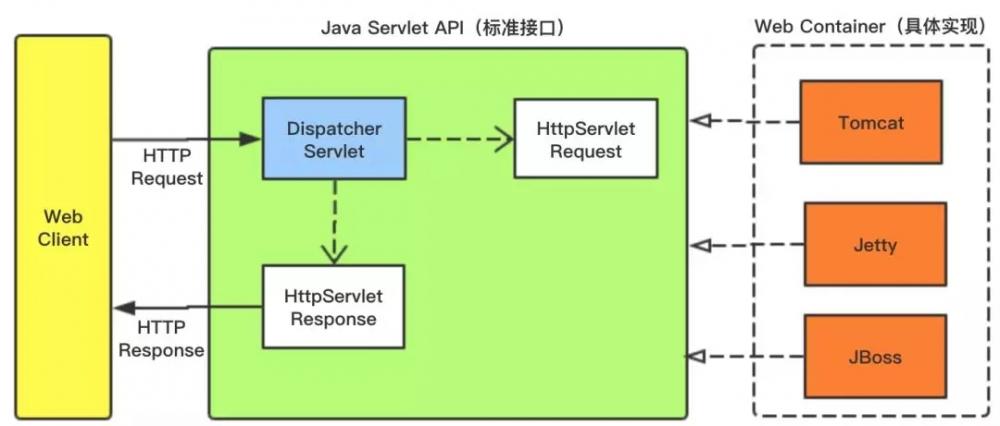
[置顶]软件接口设计怎么做?前后端分离软件接口设计思路
本文关于软件接口设计怎么做?前后端分离软件接口设计思路。好的系统架构离不开好的接口设计,因此,真正懂接口设计的人往往是软件设计队伍中的稀缺型人才。为什么在接口制定标准中说:一流的企业做标准,二流的企业...
-
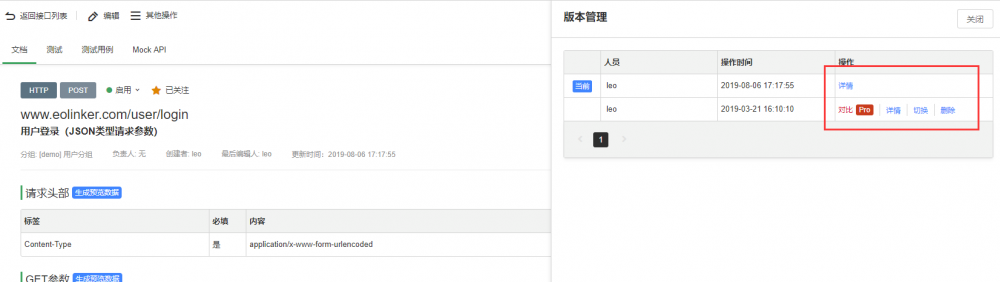
[置顶]接口管理如何做?接口实现版本管理的意义和最佳方法
本文关于接口管理如何做?接口实现版本管理的意义和最佳方法。API版本管理的重要性不言而喻,对于API的设计者和使用者而言,版本管理都有着非常重要的意义。下面会从WEB API 版本管理的角度提供几种常...
-
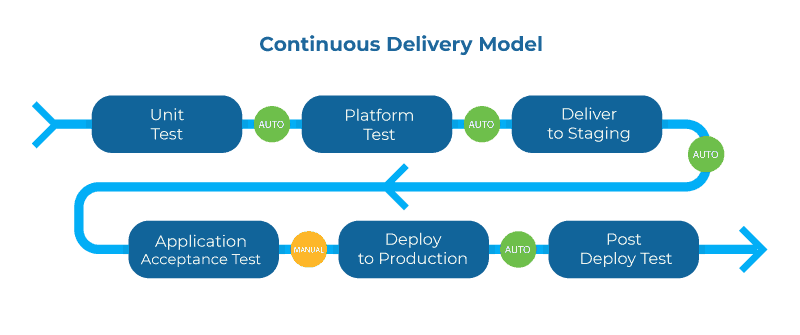
[置顶]实现API管理系统的关键
下面将通过几个关键词的形式说明API管理的重要性和未来的实现方式。1.生命周期管理在整个API生命周期中更深入地集成所有工具将进一步提高生命周期循环的速度,而且更重要的是提供满足消费者需求的API。这...
-

python3.7.3安装pyspider遇到的坑(python3.7安装失败)
python3.7.3安装pyspider遇到的坑(python3.7安装失败)接着上一篇,本来以为pyspider装成功了,后来失业pyspider all验证时,发现又报错了:原因是从python...
-

python中正则表达式的一些问题(python中的正则表达式是什么意思)
python中正则表达式的一些问题(python中的正则表达式是什么意思)今天听到一句话,觉得很在理——"当你遇到一个问题,想到用正则表达式解决时,就变成了两个问题"这也从侧面说明了正则表达式比较难理...
-
python中的单引号双引号和三引号(python里面单引号双引号三引号的用法)
python中的单引号双引号和三引号(python里面单引号双引号三引号的用法)python的单引号和双引号没有本质的区别,而三引号有两种作用:注释和换行一. 单引号中可以包含双引号,双引号中可以包含...
-
python中利用正则表达式匹配ip地址(正则表达式提取ip地址)
python中利用正则表达式匹配ip地址(正则表达式提取ip地址)现在有一道题目,要求利用python中re模块来匹配ip地址,我们应如何着手?首先能想到的是ip地址是数字,正则表达式是如何匹配数字的...
-

springCloud gateWay 统一鉴权的实现代码
springCloud gateWay 统一鉴权的实现代码目录一,统一鉴权1.1鉴权逻辑1.2代码实现一,统一鉴权内置的过滤器已经可以完成大部分的功能,但是对于企业开发的一些业务功能处理,还是需要我们...
-

python之单元测试框架—unittest(python第一单元测试)
python之单元测试框架—unittest(python第一单元测试)一. 什么是单元测试?单元测试的对象是什么?1: 什么是单元测试?按照定义,单元测试就是对单个模块或者单个类或者单个函数进行测试...
-

python如何获取多个excel单元格的值
python如何获取多个excel单元格的值一. 获取多个单元格的值报错:AttributeError: 'tuple' object has no attribute 'value'需要读取的sam...
-
python中常用的文件和目录操作(二)
python中常用的文件和目录操作(二)一. os模块概述python os模块提供了非常丰富的方法用来处理文件和目录二. 导入os模块:import os三. 常用方法1. os.name 输出字符...
-

python中常用的文件和目录操作(一)
python中常用的文件和目录操作(一)常用的文件操作1. 打开文件open,它是一个内置函数,可以直接调用语法:file object = open(file_name, [access_mode]...
-
气温变化对比图
<#list scores as item>
${item}
#list>
2、获取模板内容并填充数据
public static String getContent(String fileName,Object data){
String templatePath=getPDFTemplatePath(fileName).replace("\\", "/");
String templateFileName=QPaPBQxUDgetTemplateName(templatePath).replace("\\", "/");
String templateFilePath=getTemplatePath(templatePath).replace("\\", "/");
System.out.println("templatePath:"+templatePath);
System.out.println("templateFileName:"+templateFileName);
System.out.println("templateFilePath:"+templateFilePath);
if(StringUtils.isEmpty(templatePath)){
throw new FreeMarkerException("templatePath can not be empty!");
}
try{System.out.println("进到这里了,有来无回1");
Configuration config = new Configuration(Configuration.VERSION_2_3_25);
config.setDefaultEncoding("UTF-8");
config.setDirectoryForTemplateLoading(new File(templateFilePath));
config.setTemplateExceptionHandler(TemplateExceptionHandler.RETHROW_HANDLER);
config.setLogTemplateExceptions(false);System.out.println("进到这里了,有来无回2");
Template template = config.getTemplate(templateFileName);System.out.println("进到这里了,有来无回3");
StringWriter writer = new StringWriter();
template.process(data, writer);
writer.flush();
String html = writer.toString();
return html;
}catch (Exception ex){
throw new FreeMarkerException("FreeMarkerUtil process fail",ex);
}
}
public static String getContent(String fileName,Object data){
String templatePath=getPDFTemplatePath(fileName);//根据PDF名称查找对应的模板名称
String templateFileName=getTemplateName(templatePath);
String templateFilePath=getTemplatePath(templatePath);
if(StringUtils.isEmpty(templatePath)){
throw new FreeMarkerException("templatePath can not be empty!");
}
try{
Configuration config = new Configuration(Configuration.VERSION_2_3_25);//FreeMarker配置
config.setDefaultEncoding("UTF-8");
config.setDirectoryForTemplateLoading(new File(templateFilePath));//注意这里是模板所在文件夹,不是文件
config.setTemplateExceptionHandler(TemplateExceptionHandler.RETHROW_HANDLER);
config.setLogTemplateExceptions(false);
Template template = config.getTemplate(templateFileName);//根据模板名称 获取对应模板
StringWriter writer = new StringWriter();
template.process(data, writer);//模板和数据的匹配
writer.flush();
String html = writer.toString();
return html;
}catch (Exception ex){
throw new FreeMarkerException("FreeMarkerUtil process fail",ex);
}
}
3、导出模板到PDF文件
/**
* @description 导出pdf到文件
* @param fileName 输出PDF文件名
* @param data 模板所需要的数据
*
*/
public String exportToFile(String fileName,Object data){
try {
String htmlData= FreeMarkerUtil.getContent(fileName, data);
if(StringUtils.isEmpty(saveFilePath)){
saveFilePath=getDefaultSavePath(fileName);
}
File file=new File(saveFilePath);
if(!file.getParentFile().exists()){
file.getParentFile().mkdirs();
}
FileOutputStream outputStream=null;
try{
//设置输出路径
outputStream=new FileOutputStream(saveFilePath);
//设置文档大小
Document document = new Document(PageSize.A4);
PdfWriter writer = PdfWriter.getInstance(document, outputStream);
//设置页眉页脚
PDFBuilder builder = new PDFBuilder(headerFooterBuilder,data);
builder.setPresentFontSize(10);
writer.setPageEvent(builder);
//输出为PDF文件
convertToPDF(writer,document,htmlData);
}catch(Exception ex){
throw new PDFException("PDF export to File fail",ex);
}finally{
IOUtils.closeQuietly(outputStream);
}
} catch (Exception e) {
e.printStackTrace();
}
return saveFilePath;
}
4、测试工具类
public String createPDF(Object data, String fileName){
//pdf保存路径
try {
//设置自定义PDF页眉页脚工具类
PDFHeaderFooter headerFooter=new PDFHeaderFooter();
PDFKit kit=new PDFKit();
kit.setHeaderFooterBuilder(headerFooter);
//设置输出路径
kit.setSaveFilePath("D:/Users/hello.pdf" alt="java根据模板导出PDF的详细实现过程" title="java根据模板导出PDF的详细实现过程" width="200" height="150">
java根据模板导出PDF的详细实现过程
java根据模板导出PDF的详细实现过程目录题记:一、需求二、解决方案三、实现功能四、主要代码结构说明:五、关键代码说明1、模板配置2、获取模板内容并填充数据3、导出模板到PDF文件4、测试工具类六、...
